










If your audiobook does not begin playing automatically:



You have chosen to import your FREE audiobook, “KEEPING THE FAITH through the UN-thinkable…” into an audiobook player App on your Apple device, continuing with Step 3.
NOTE: Apple Books on your Apple computer or device will not play FREE self-published audiobooks.
Read on to find out how to listen to this FREE audiobook using a FREE alternative audiobook player App...
Open your App and import your recently downloaded audiobook m4b file:
“KEEPING THE FAITH through the UN-thinkable...”. Then press/click Play and let the enlightening begin!
If you do NOT have an alternative audiobook player App:
We have the solution for you! We have tried and tested an App called BookPlayer for Apple devices. It is FREE! NO-Ads, NO Fees & NO in-app purchases. It is really easy to use, with great features. (We receive no benefits/royalties from you getting this App.)
To get the App, click the “Get BookPlayer (App Store)” button below and, once installed, return to this page and go to STEP 4.
NOTE: As you complete each step of the process in the Apps/applications you will be going back and forth to, return to this page to continue with the next step.
Step-by-step guide to import your new audiobook: “KEEPING THE FAITH through the UN-thinkable…”
Currently, there will be no books in your BookPlayer App library, so the opening App screen will automatically show a large “+ Add Files” button in the middle of the screen (See screenshot below – circled yellow) – Click/Press this button to locate and import your recently downloaded book.
Follow these steps:
- Click/press the symbol at the top right of screen
(three horizontal dots in a circle highlighted in green square in above image)
- At the top of the drop down menu that appears, click/press "Import Files" button.
Find the audio book file
that you downloaded.
A pop-up window shows the “Recents” (recently added files) in your “Files” App. The App may automatically find recently downloaded audiobooks, in which case select “KEEPING THE FAITH through the UN-thinkable…”, ensuring you select the one that states under the audiobook title, “On My iPhone/iPad/etc.”
(See screenshot below)
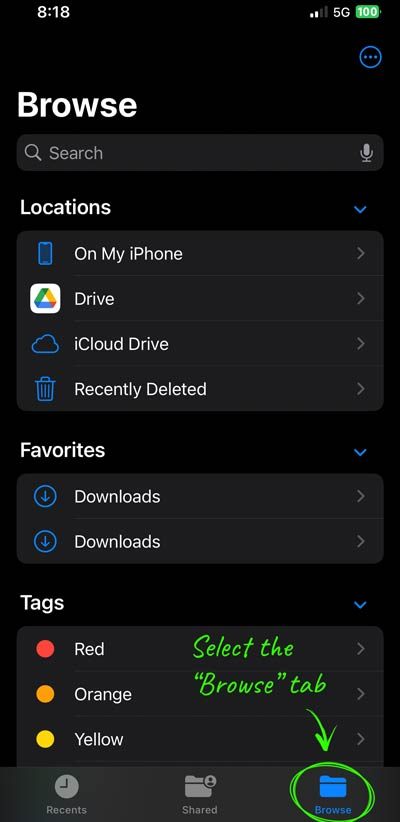
Your downloaded audiobook might not be in the default folder "Downloads." It might be in your preferred location for downloads according to your device settings (1. Elsewhere in your device “Files” folder, or 2. Your online storage, example: iCloud , Google Drive, etc.).
Navigate to it by selecting the "Browse" tab (see circled highlight in screenshot below), then select one of the drive options, then find and select “KEEPING THE FAITH through the UN-thinkable...”
(See screenshot below)
Confirm Audiobook Selection
If the correct audiobook has been selected for importing: “KEEPING THE FAITH through the UN-thinkable…,” then click/press “Done” in the top right corner.
(See screenshot below – circled yellow)
Select “Library” from list of folder options for importing.
The audiobook “KEEPING THE FAITH through the UN-thinkable…” will now appear in your App Library.
(See screenshot below – circled yellow)
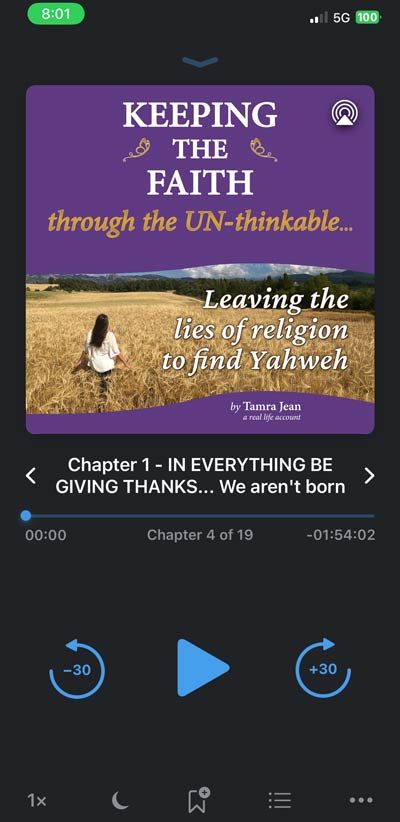
Once your audiobook is imported, it will appear in the Library of your BookPlayer App or it will begin to play automatically.
(See screenshot below)
Click/Press on the front cover image of the audiobook in the Library list in your BookPlayer App to begin playing it.
Yahweh spoke and CREATED the world! || Be ambitious to be quiet || Speak ONLY what Yahweh directs you to speak! || Request in Yeshua’s Name, believing, and it will occur! || No joking! (No tainted words… and no stupid speaking… etc) || No logical reasoning or complaining! || Speak TRUTH! || Speak about Yahweh only!
Yahweh spoke and CREATED the world!
3 And Elohim said: Let light come to be! And light came to be.
~ ~ ~ ~ ~ ~ ~
26 And Elohim said: Let Us make humanity in Our image and according to Our likeness.
Be ambitious to be quiet…
11 and that you be ambitious to be quiet, and to be engaged in your own affairs, and to be working with your hands, according as we charge you,
Speak ONLY what Yahweh directs you to speak!
49 “…seeing that I speak not from Myself, but the Father Who sends Me, He has given Me the precept, what I may be saying and what I should be speaking. 50 And I am aware that His precept is life eonian. What, then, I am speaking, according as the Father has declared it to Me, thus am I speaking.”
~ ~ ~ ~ ~ ~ ~
28 Jesus, then, said to them again that “Whenever you should be exalting the Son of Mankind, then you will know that I am, and from Myself I am doing nothing, but, according as My Father teaches Me, these things I am speaking. 29 And He Who sends Me is with Me. He does not leave Me alone, for what is pleasing to Him am I doing always.”
~ ~ ~ ~ ~ ~ ~
18 For I am not daring to speak any of what Christ does not effect through me for the obedience of the nations, in word and work, 19 in the power of signs and miracles, in the power of God’s spirit, so that, from Jerusalem and around unto Illyricum, I have completed the evangel of the Christ.
~ ~ ~ ~ ~ ~ ~
16 Jesus, then, answered them and said, “My teaching is not Mine, but His Who sends Me. 17 If anyone should be wanting to be doing His will, he will know concerning the teaching, whether it is of God or I am speaking from Myself. 18 He who is speaking from himself is seeking his own glory, yet He Who is seeking the glory of Him Who sends Him, this One is true, and injustice is not in Him.”
~ ~ ~ ~ ~ ~ ~
45 “The good man out of the good treasure of his heart is bringing forth that which is good, and the wicked man out of the wicked treasure of his heart is bringing forth that which is wicked, for out of the superabundance of the heart his mouth is speaking.”
Request in Yeshua’s Name, believing, and it will occur!
22 And answering, Jesus is saying to them, “If you have faith of God, 23 verily, I am saying to you that whosoever may be saying to this mountain, ‘Be picked up and cast into the sea,’ and may not be doubting in his heart, but should be believing that what he is speaking is occurring, it shall be his, whatsoever he may be saying.”
24 “Therefore I am saying to you, All, whatever you are praying and requesting, be believing that you obtained, and it will be yours.”
~ ~ ~ ~ ~ ~ ~
7 “Request and it shall be given you. Seek and you shall find. Knock and it shall be opened to you. 8 For everyone who is requesting is obtaining, and who is seeking is finding, and to him who is knocking it shall be opened.”
~ ~ ~ ~ ~ ~ ~
12 “Verily, verily, I am saying to you, he who is believing in Me, the works which I am doing he also will be doing, and greater than these will he be doing, for I am going to the Father. 13 And whatever you should be requesting in My name, this I will be doing, that the Father should be glorified in the Son. 14 If you should ever be requesting anything of Me in My name, this I will be doing.”
~ ~ ~ ~ ~ ~ ~
7 “If ever you should be remaining in Me and My declarations should be remaining in you, whatever you should be wanting, request, and it will be occurring to you.”
~ ~ ~ ~ ~ ~ ~
23 “Verily, verily, I am saying to you that whatever you should be requesting the Father, He will be giving it to you in My name. 24 Hitherto you do not request anything in My name. Request and you shall obtain, that your joy may be full.”
~ ~ ~ ~ ~ ~ ~
19 “Again, verily, I am saying to you that, if ever two of you should be agreeing on the earth concerning any matter, whatsoever it is they should be requesting shall be coming to them from My Father Who is in the heavens. 20 For where two or three are, gathered in My name, there am I in the midst of them.”
~ ~ ~ ~ ~ ~ ~
21 Now, answering, Jesus said to them, “Verily, I am saying to you, If you should be having faith and not be doubting, not only that to the fig tree will you be doing, but if you should be saying to this mountain also, ‘Be picked up and cast into the sea!’ it will be occurring. 22 And all, whatsoever you should be requesting in prayer, believing, you shall be getting.”
No joking. (No tainted words… and no stupid speaking… etc)
29 Let no tainted word at all be issuing out of your mouth, but if any is good toward needful edification, that it may be giving grace to those hearing.
30 And do not be causing sorrow to the holy spirit of God by which you are sealed for the day of deliverance.
~ ~ ~ ~ ~ ~ ~
~ ~ ~ ~ ~ ~ ~
36 “Now I am saying to you that, for every idle declaration which men shall be speaking, they shall be rendering an account concerning it in the day of judging. 37 For by your words shall you be justified, and by your words shall you be convicted.”
~ ~ ~ ~ ~ ~ ~
1 As dead gadflies cause a compound of oil to stink, to bubble forth, So a little frivolity [characterized by lack of seriousness or sense. frivolous conduct; self-indulgently carefree; unconcerned about or lacking any serious purpose – Dictionary.com] outweighs wisdom and glory…12 Words from the mouth of a wise man are grace, Yet the lips of a stupid man swallow him up.13 At the start the words of his mouth are frivolity, And at last from his mouth comes evil raving.
~ ~ ~ ~ ~ ~ ~
~ ~ ~ ~ ~ ~ ~
5 … and leading into captivity every apprehension into the obedience of Christ,
~ ~ ~ ~ ~ ~ ~
9 And this I am praying, that your love may be superabounding still more and more in realization and all sensibility, 10 for you to be testing what things are of consequence, that you may be sincere and no stumbling block for the day of Christ,
…
27 Only be citizens walking worthily of the evangel of Christ,
~ ~ ~ ~ ~ ~ ~
Read also Mark 5:39-40 (Yeshua Christ throws out those who laughed Him to scorn), Proverbs 10:8 and 10 (foolish of lips), Ecclesiastes 10:3 & 5-6 & 14 (frivolity), 2 Corinthians 5:16-17 (new creation), 1 John 2:15-17 (of the world), Philippians 4:8 (whatever is grave/serious be taking into account), Proverbs 4:23-24 (perverse mouth, devious lips), 1 Timothy 6:20-21 (profane prattlings), Colossians 3:9 & 1 John 2:21 (jokes are lies not truths), 1 Timothy 1:5-11 (anything opposing sound teaching), James 1:5-8 (double souled, serious and then joking), Proverbs 3:34 (mockers), James 3:1-13 (unbridled tongue), Ephesians 5:3-13 (vileness and stupid speaking or insinuendo/wit/facetiousness/pleasantry/jesting), 1 Timothy 6:3-4a (sound words), Colossians 2:8 (human tradition is to joke), Hebrews 11:14 (holiness), etc…
No logical reasoning or complaining!
14 All be doing without murmurings and reasonings…
~ ~ ~ ~ ~ ~ ~
10 Nor yet be murmuring even as some of them murmur, and perished by the exterminator.
Speak TRUTH!
22 False lips are an abhorrence to Yahweh,
Yet those who hold to truth are dear to Him.
~ ~ ~ ~ ~ ~ ~
8 For the rest, brethren, whatever is true, whatever is grave, whatever is just, whatever is pure, whatever is agreeable, whatever is renowned — if there is any virtue, and if any applause, be taking these into account.
~ ~ ~ ~ ~ ~ ~
14 And, coming, they are saying to Him, “Teacher, we are aware that you are true, and you are not caring about anyone, for you are not looking at the face of men, but, of a truth, the way of God are you teaching…”
~ ~ ~ ~ ~ ~ ~
44 “You are of your father, the Adversary, and the desires of your father you are wanting to do. He was a man-killer from the beginning, and does not stand in the truth, for truth is not in him. Whenever he may be speaking a lie, he is speaking of his own, for he is a liar, and the father of it. 45 Yet I — seeing that I am speaking the truth, you are not believing Me. 46 Who of you is exposing Me concerning sin? If I am telling the truth, wherefore are you not believing Me?”
~ ~ ~ ~ ~ ~ ~
28 Jesus, then, said to them again that “Whenever you should be exalting the Son of Mankind, then you will know that I am, and from Myself I am doing nothing, but, according as My Father teaches Me, these things I am speaking.”
~ ~ ~ ~ ~ ~ ~
18 For I am not daring to speak any of what Christ does not effect through me for the obedience of the nations, in word and work, 19 in the power of signs and miracles, in the power of God’s spirit, so that, from Jerusalem and around unto Illyricum, I have completed the evangel of the Christ.
Speak about Yahweh only!
18 Hence you will place these my words in your heart and in your soul, and you will tie them as a sign on your hand, and let them come to be as brow-bands between your eyes. 19 You will teach them to your sons, speaking of them when you sit in your house, when you walk on the road, when you lie down and when you arise. 20 You will write them on the jambs of your house and on your gates,
~ ~ ~ ~ ~ ~ ~
1 And I, coming to you, brethren, came not with superiority of word or of wisdom, announcing to you the testimony of God, 2 for I decide not to perceive anything among you except Jesus Christ and Him crucified. 3 And I came to be with you in weakness, and in fear, and in much trembling, 4 and my word and my heralding were not with the persuasive words of human wisdom, but with demonstration of spirit and of power, 5 that your faith may not be in the wisdom of men but in the power of God.